Trial Support: How to Organize Exhibits for Instant Retrieval
.png)

Exhibit chaos is one of the fastest ways to lose time (and credibility) at trial. The goal of trial support is simple: any document, photo, or record should be findable in seconds, by anyone on the team, under pressure. This guide lays out a practical, courtroom-tested system to organize exhibits for instant retrieval, whether you are working from binders, a shared drive, or a trial presentation platform.
Start with the retrieval moment (not the filing moment)
Before you create folders, decide how you will actually search mid-hearing or mid-cross.
In real time, people look for exhibits by:
- Exhibit number or letter (PX-12, DX-4)
- Witness association (treating doctor, adjuster, corporate rep)
- Topic (liability, causation, damages, notice)
- Date (timeline moments)
- Bates range
A good structure supports at least two of those paths instantly, and ideally all of them.
Use a single source of truth: an exhibit index that drives everything
Your exhibit index (often called an exhibit list) should be the hub. If your index is clean, everything else becomes searchable.
At minimum, include these columns:
- Exhibit ID (placeholder early, final at pre-marking)
- Short name (human-readable in 2 to 6 words)
- Description (one sentence)
- Date
- Bates range
- Source (producing party, subpoena return, client)
- Foundation witness (who can authenticate)
- Status (proposed, pre-marked, admitted, excluded)
This is also where you build in evidence hygiene. For example, authentication is a recurring courtroom pain point, and FRE 901 is the baseline reference many courts mirror.
Adopt a naming convention that sorts correctly and reads clearly
“Scan1234.pdf” is not trial support, it is a future emergency.
A useful naming convention:
- Sorts naturally (no random text at the front)
- Survives exporting, emailing, and uploading
- Shows the exhibit’s “why” at a glance
Here is a simple format that works for most civil cases:
| Field | Example | Why it matters |
|---|---|---|
| Topic code | DAM, LIA, MED | Groups related exhibits instantly |
| Date (YYYY-MM-DD) | 2025-11-03 | Sorts chronologically |
| Short title | ER_Visit_Records | Quick identification |
| Bates | ABC000123-000140 | Cross-check to discovery |
| Version tag | v1, v2 | Prevents “wrong file” moments |
Example filename:
MED_2025-11-03_ER_Visit_Records_ABC000123-000140_v1.pdf
If your court requires exhibit stickers or pre-marking, keep the exhibit number out of the filename until numbering is final. Instead, map exhibit numbers in your exhibit index.
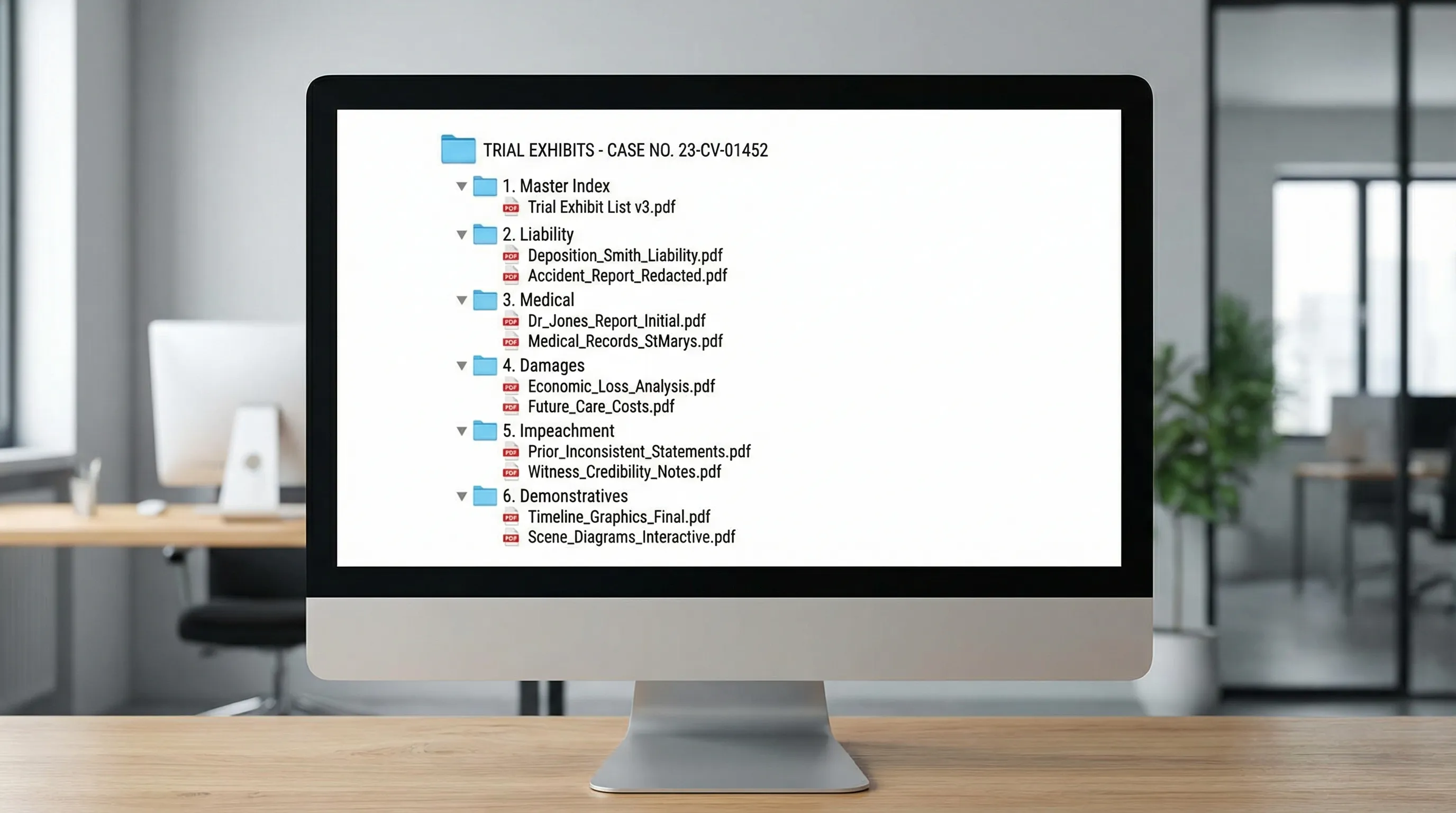
Build folders around how you argue the case
The biggest mistake teams make is mirroring the discovery production structure. That is useful for responding to requests, but not for trying a case.
A trial-ready folder structure usually maps to the story you will tell:
| Top folder | What goes inside | Typical users |
|---|---|---|
| 00_Master_Index | Exhibit index, witness list, issue list | Everyone |
| 01_Liability | scene photos, incident reports, policies | trial counsel, paralegal |
| 02_Medical | key records, billing, imaging reports | med-chron team, trial counsel |
| 03_Damages | wage loss, receipts, life care | damages specialist |
| 04_Impeachment | prior statements, inconsistent records | cross examiner |
| 05_Demonstratives | summaries, timelines, charts | trial team |
Keep the folder count low. If you need 20 top-level folders, your structure is doing too much.
Make every exhibit text-searchable (OCR) and linkable
Instant retrieval is usually “search,” not “browse.” Two steps make search reliable:
OCR everything that is not born-digital
Run OCR on scans so you can search for:
- medication names
- addresses
- CPT codes
- “denies,” “admits,” “per our conversation”
Spot-check OCR quality on the worst scans, not the best.
Use one consistent citation style in notes and outlines
When you draft deposition outlines, witness prep notes, and trial outlines, always cite exhibits the same way (for example: ABC000123 or Ex. P-12).
That consistency is what enables fast searching and cross-referencing across the team.
Pre-plan admissibility and foundation in the index
Instant retrieval is not just finding the file. It is also finding the “why it comes in.” Add quick fields to your index for:
- foundation witness
- hearsay exceptions or business records route (as applicable)
- redactions needed
- stipulations requested
If you plan to use summaries, charts, or calculations, FRE 1006 is the common federal reference point for summary evidence (state rules may vary). The practical takeaway is to track what underlying materials support each summary.
Use “working sets” for each witness
Most trials are won or lost on witness flow. Create a witness folder (or filtered view) that contains only what that witness needs:
- expected direct exhibits
- likely cross exhibits
- impeachment set
- one-page foundation checklist (auth, relevance, completeness)
This reduces cognitive load and prevents the common mistake of pulling the right exhibit from the wrong version.
Quality control: the 10-minute “hot seat” test
Before a hearing or trial day, run a drill:
Pick 10 exhibits at random and ask a team member to retrieve each one by:
- exhibit number (or placeholder ID)
- keyword search
- Bates range
If any retrieval takes longer than 15 seconds, fix the structure, naming, or OCR before court fixes it for you.
Where AI can help trial support teams move faster
Even with great organization, the time sink is turning documents into usable trial materials. Tools like TrialBase AI are designed to help legal teams go from uploaded documents to litigation-ready work product in minutes, including medical summaries, deposition outlines, demand letters, and trial material preparation. Used well, this speeds up the step where your exhibit set becomes a coherent, searchable case narrative.
Frequently Asked Questions
How early should we start organizing trial exhibits? Start as soon as you have your first meaningful production. If you wait until pretrial deadlines, you will build the system while under maximum pressure.
Should exhibit folders mirror Bates ranges or topics? Topics usually win for trial retrieval. Bates ranges are best handled in the exhibit index and filename suffix so you can still locate discovery instantly.
Is it better to label exhibits by number early? Not usually. Numbers change. Use stable IDs (and Bates ranges) early, then map to final exhibit numbers once pre-marking is set.
What is the fastest way to retrieve an exhibit in court? A text-searchable PDF set (OCR), consistent naming, and a clean exhibit index. Browsing folders alone is rarely fast enough under pressure.
Make exhibit retrieval a solved problem
If your team is spending hours turning records into outlines, summaries, and trial-ready materials, you can reclaim that time.
TrialBase AI helps you upload case documents and generate litigation work product like medical summaries, deposition outlines, demand letters, and other trial materials in minutes, so your exhibit organization is backed by case-ready content.
Explore TrialBase AI here: https://ai.trialbase.com