Trial Base: Best Workflows to Turn Documents Into Drafts
.png)

When litigation work gets busy, the bottleneck is rarely legal knowledge. It is the time it takes to turn raw records, PDFs, and discovery into clean, usable drafts. A strong workflow makes that conversion repeatable, auditable, and fast, without sacrificing attorney judgment.
Below are practical, litigation-ready workflows you can run in TrialBase AI to transform documents into first drafts (demand letters, medical summaries, deposition outlines, and other trial materials) in minutes, then tighten them into filing or negotiation quality.
Workflow 1: “Clean intake” before you upload
AI output quality tracks input quality. Spending a few minutes standardizing files prevents hours of downstream confusion.
Focus on three habits:
- Name files like you will cite them later:
YYYY-MM-DD_Source_DocType_Patient-Client.pdf(example:2025-11-03_StMarys_ER_Records_JDoe.pdf). - Split huge PDFs into logical chunks (ER visit, imaging, billing, follow-up). Smaller uploads are easier to analyze and verify.
- Keep a simple index (even a one-paragraph notes file) that explains what is in the batch and what you need drafted.
This step matters most for medical-heavy cases and document-dense PI files, where chronology and attribution are everything.
Workflow 2: Build a “document set” that matches your draft
Instead of uploading everything at once, group documents by the draft you want.
Examples:
- Demand letter set: liability facts + key damages + billing + wage loss + photos.
- Medical summary set: medical records + imaging reports + itemized billing.
- Deposition outline set: pleadings + interrogatories/requests + key records for impeachment.
In TrialBase AI, you can upload your documents and generate litigation outputs quickly, so the goal is to feed each output the most relevant record set, not the biggest one.
Workflow 3: Run “chronology first,” then draft
A common mistake is drafting too early. The fastest way to a trustworthy first draft is:
- Extract the timeline, then
- Draft from the timeline.
For personal injury and med-mal workflows, chronology reduces missed dates, inconsistent provider names, and duplicated events. Once you have a coherent sequence, generating a medical summary or demand narrative becomes a controlled transformation, not a creative guess.
If you are producing a demand letter, chronology also helps you structure damages persuasively: baseline health, mechanism of injury, acute care, follow-ups, ongoing limitations, and future care.
Workflow 4: Use “draft types” with a defined review checklist
Different drafts fail in different ways. Pair each draft type with a short QC checklist so review becomes consistent across your team.
| Draft you need | Best input documents | What to verify before using | Common failure to catch |
|---|---|---|---|
| Demand letter | Liability facts, key medical records, specials, wage loss | Dates, claimed injuries vs records, totals, treatment gaps | Overstated causation or missing intervening events |
| Medical summary | All relevant medical records, imaging, billing | Chronology, provider attribution, objective findings, meds/procedures | Mixing subjective complaints with objective findings |
| Deposition outline | Pleadings, discovery responses, core records | Topic coverage, exhibit callouts, impeachment hooks | Missing “lock-in” questions tied to elements |
| Trial materials (as needed) | The subset tied to the issue you are proving | Source cites, consistency with pleadings and discovery | Inconsistent terminology across documents |
A repeatable checklist is also a risk-management tool, especially when you are working quickly.
Workflow 5: Treat AI drafts as “version 0,” then iterate in tight loops
The most efficient teams do not ask for “the perfect draft.” They ask for a good first pass, then iterate.
A practical loop looks like this:
- Pass 1 (speed): Generate the draft you need (for example, medical summary).
- Pass 2 (accuracy): Confirm key facts against the source pages (dates, diagnoses, billing totals, quoted language).
- Pass 3 (strategy): Adjust tone, theme, and ordering for the audience (carrier adjuster vs defense counsel vs jury).
With TrialBase AI, the point is to reduce the blank-page time dramatically, then re-invest that saved time into case strategy and precision editing.
Workflow 6: Build “standard sections” you reuse across matters
Consistency is leverage. Even without fancy automation, you can standardize a few sections so every draft starts from the same proven structure.
Common reusable sections include:
- Demand letter headings (liability, injuries, treatment chronology, specials, general damages, settlement demand)
- Medical summary structure (pre-incident, incident, acute care, diagnostics, follow-up, current status)
- Deposition outline spine (background, timeline, documents, admissions by element, damages, prior statements)
Then, each new case becomes a fill-in-the-record exercise rather than a rebuild.
Workflow 7: Collaboration: assign “fact owners” before finalizing
Team collaboration is where speed can turn into errors if roles are unclear. Use a simple ownership model:
- One person verifies numbers (medical specials, wage loss, future care estimates if applicable).
- One person verifies medical accuracy (chronology, diagnoses, procedure names).
- One person verifies liability and theory (elements, admissions, comparative issues).
TrialBase AI includes a team collaboration workspace, which is best used to keep everyone in the same source set and draft version so edits do not fork into conflicting copies.
Workflow 8: Ethics and confidentiality: set your guardrails
Because these drafts can move quickly from internal to outward-facing, set guardrails early and apply them every time.
- Human review is mandatory for any output that will be sent externally or used in a deposition or trial context.
- Confirm your duty of competence when using AI tools. The ABA has addressed lawyers’ responsibilities with generative AI in Formal Opinion 512.
- Protect confidentiality and follow your firm’s security requirements for client materials.
These steps are not slowdowns. They are what let you use fast drafting safely.
Putting it together: a simple “documents to drafts” pipeline
If you want one workflow that works for most litigation teams, use this pipeline:
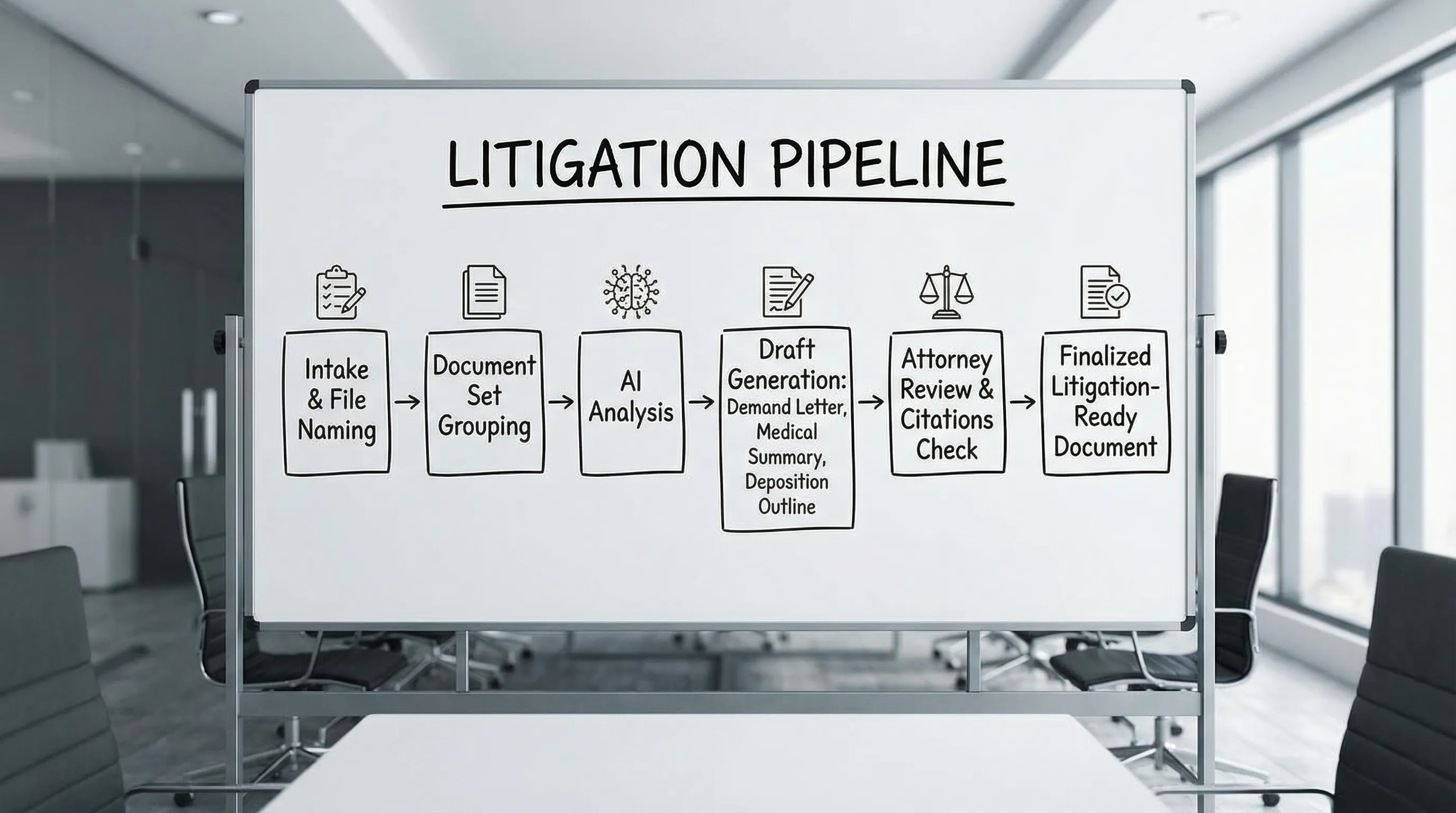
- Clean intake and naming
- Group documents by the draft you need
- Generate chronology, then generate draft
- Review with a draft-specific checklist
- Assign fact owners, finalize, and export
When you run that pipeline consistently, TrialBase AI becomes more than a drafting shortcut. It becomes a repeatable production system from intake to verdict.
To see how your current matters could fit this workflow, start with a single case type (for example, PI demands) and test one output end-to-end in TrialBase AI.