Legal IT Services: Security Controls Every Firm Needs
.png)

Client files are a prime target for attackers because they contain high value information, sensitive communications, medical records, financials, and strategy. For most firms, the biggest security risk is not a single “hacker in a hoodie”, it is everyday operational gaps: weak logins, unmanaged laptops, untested backups, and vendors that store data without clear controls.
If you’re evaluating legal IT services (or auditing your current provider), the fastest way to reduce risk is to confirm a short set of security controls that prevent the most common incidents: account takeover, ransomware, data leakage, and vendor exposure.
What “security controls” should cover in a law firm
Security controls are the policies, tools, and procedures that protect confidentiality, integrity, and availability of client data. In practical terms, they answer:
- Who can access matter data, and how do we prove it?
- What happens if a laptop is stolen or an email account is compromised?
- Can we recover quickly from ransomware without paying?
- How do we manage vendor risk when using cloud apps and AI tools?
Two widely referenced baselines for building these controls are the NIST Cybersecurity Framework (CSF) and the CIS Critical Security Controls. You do not need to “implement a framework” to benefit from it, but you can use them to validate whether your IT partner is covering the essentials.
Security controls every firm should require from legal IT services
The list below is designed to be verification-friendly, meaning you can ask for evidence, not promises.
| Security control | What it prevents | What to ask your IT provider (evidence) |
|---|---|---|
| 1) Strong identity security (MFA everywhere) | Account takeover, email compromise | Is MFA enforced for email, VPN/remote access, document systems, admin accounts? Show the policy and enforcement settings. |
| 2) Least privilege access and role-based permissions | Overexposure of matters, insider risk | How are staff permissions reviewed when people join, change roles, or leave? How often do you recertify access? |
| 3) Managed devices + endpoint protection (EDR) | Malware, ransomware, data theft | Are all laptops/desktops enrolled in device management? Do you run EDR with 24/7 monitoring or a defined escalation process? |
| 4) Patch management with deadlines | Exploits of known vulnerabilities | What are your patch SLAs (critical, high, normal)? Can you show patch compliance reports? |
| 5) Encryption in transit and at rest | Data interception, lost device exposure | Is disk encryption mandatory on laptops? Are TLS standards enforced for email and file transfer? |
| 6) Backup strategy built for ransomware | Permanent data loss, prolonged downtime | Do you maintain immutable/offline backups? How often do you test restores, and when was the last successful test? |
| 7) Email and phishing defenses | Business email compromise, wire fraud | Do you enforce DMARC, SPF, DKIM? Do you run attachment/link protection and user training? |
| 8) Central logging + alerting | Undetected breaches, slow response | What systems are logged (email, endpoints, cloud apps)? Who reviews alerts, and how quickly? |
| 9) Incident response plan and tabletop exercises | Chaos during an incident | Can you provide an incident response runbook? When was the last tabletop exercise, and what changed afterward? |
| 10) Vendor risk management (including AI tools) | Third-party leaks, unclear data retention | Do you track vendors that touch client data? Do you require security documentation (SOC 2, pen tests, DPAs) and review retention/deletion terms? |
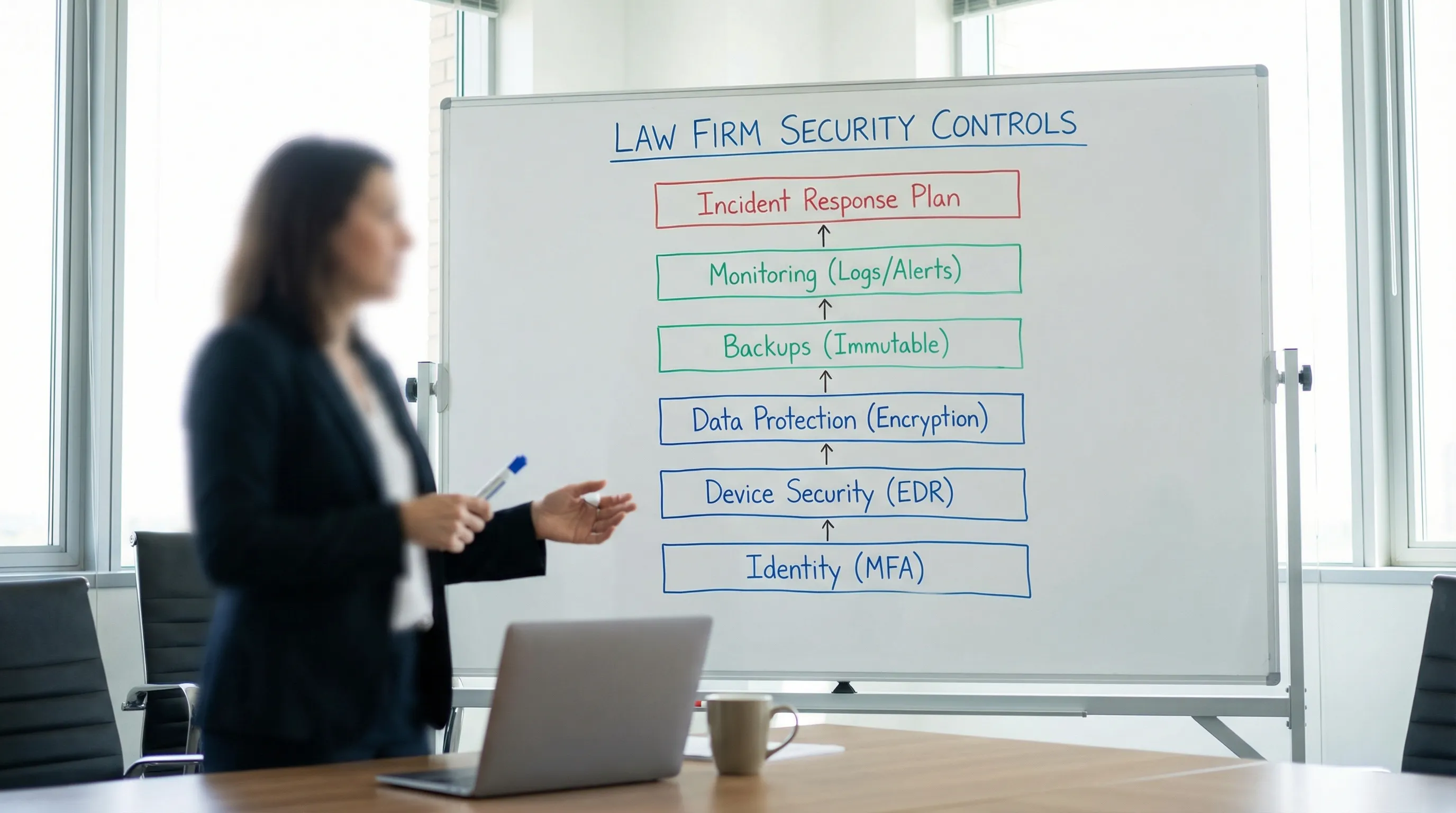
How these controls map to real law-firm risks
Most legal incidents cluster into a few categories:
- Compromised email accounts lead to exposed client communications, fake invoice instructions, and downstream credential theft.
- Ransomware is often enabled by a single unpatched device or a user with excessive access.
- Misconfigured sharing (public links, broad folders, unmanaged personal devices) quietly exposes matter data.
- Third-party tools (including document automation and AI) can expand your risk surface if contracts and retention are unclear.
A good IT partner can help you implement controls, but they should also help you prove controls are working through reporting, testing, and repeatable processes.
A 10-minute “first call” checklist for legal IT services
Use these questions to quickly separate marketing language from operational maturity:
- Do you enforce MFA across all firm systems, including admin accounts?
- Are all endpoints managed (inventory, encryption, EDR), including partner devices?
- What are your patch timelines, and can you show compliance reporting?
- Describe your ransomware backup design (immutable/offline) and restore testing cadence.
- Who monitors alerts, and what is the response time expectation?
- What is your incident response process, and do you coordinate with cyber insurance?
- How do you handle offboarding so accounts and device access are removed immediately?
- How do you evaluate vendors that process client data, including cloud and AI tools?
If answers are vague, ask for one concrete artifact: a sample report, a redacted policy, or a screenshot of an enforcement setting.
Litigation-specific considerations (medical records, discovery, and collaboration)
Litigation workflows raise the stakes because files often include medical summaries, expert materials, discovery productions, and deposition preparation. That means your controls should also address:
- Secure collaboration: clear matter-level permissions, not “everyone can see everything.”
- Controlled sharing: expiring links, download restrictions where appropriate, and audit trails.
- Data minimization: only upload and share what’s needed for the task, especially with third-party services.
- Retention and deletion: defined timelines for drafts, exports, and generated work product.
If your firm uses tools that transform documents into litigation outputs (for example, medical summaries, deposition outlines, demand letters), treat them like any other vendor that touches sensitive client data. Ask about access controls, audit logs, retention, and contractual terms before rolling them out broadly.
Frequently Asked Questions
What are legal IT services in a law firm? Legal IT services typically cover managed devices, networking, cloud systems (email, file storage, practice tools), security controls, help desk support, and compliance-oriented reporting.
Is MFA really necessary for small firms? Yes. Firm size is not a meaningful defense, and email accounts are frequently targeted. MFA is one of the highest impact, lowest disruption controls you can implement.
What backup setup best protects against ransomware? Look for backups that cannot be modified by compromised admin accounts (immutable or offline), plus routine restore tests. A backup you have never restored is not yet a backup you can trust.
What should we ask vendors that process client documents, including AI tools? Ask about encryption, access controls, audit logging, retention/deletion, subcontractors, and security attestations (for example SOC 2 reports, where available). Confirm the contract terms match your ethical and client obligations.
Do we need a written incident response plan? Yes. Even a concise plan improves speed and decision-making during an incident, clarifies who calls insurance and counsel, and reduces downtime.
Make litigation work product faster without losing control of security
If your team is trying to move faster from intake to demand to trial prep, tools can help, but only if they fit your security requirements and workflow.
TrialBase AI helps legal professionals turn uploaded documents into litigation-ready outputs (like demand letters, medical summaries, and deposition outlines) in minutes. If you’re evaluating whether it fits your practice, start by reviewing how it would be used in your matters (who uploads, who can access outputs, what gets stored, and for how long).
Explore the platform here: TrialBase AI